Conditional Logic Free
Show or hide any form field based on another field's value. Supports AND/OR logic and all 16+ Elementor field types.

Building forms that feel simple yet powerful is the key to better user engagement. With the Conditional Logic Fields Plugin for Elementor Forms, you can transform basic forms into intelligent, interactive experiences. This plugin is designed for users who want flexibility, control, and performance while working with Elementor without adding complexity.
Whether you're creating a contact form, survey, or booking form, adding conditional fields for Elementor helps you show only what matters to your users at the right time.
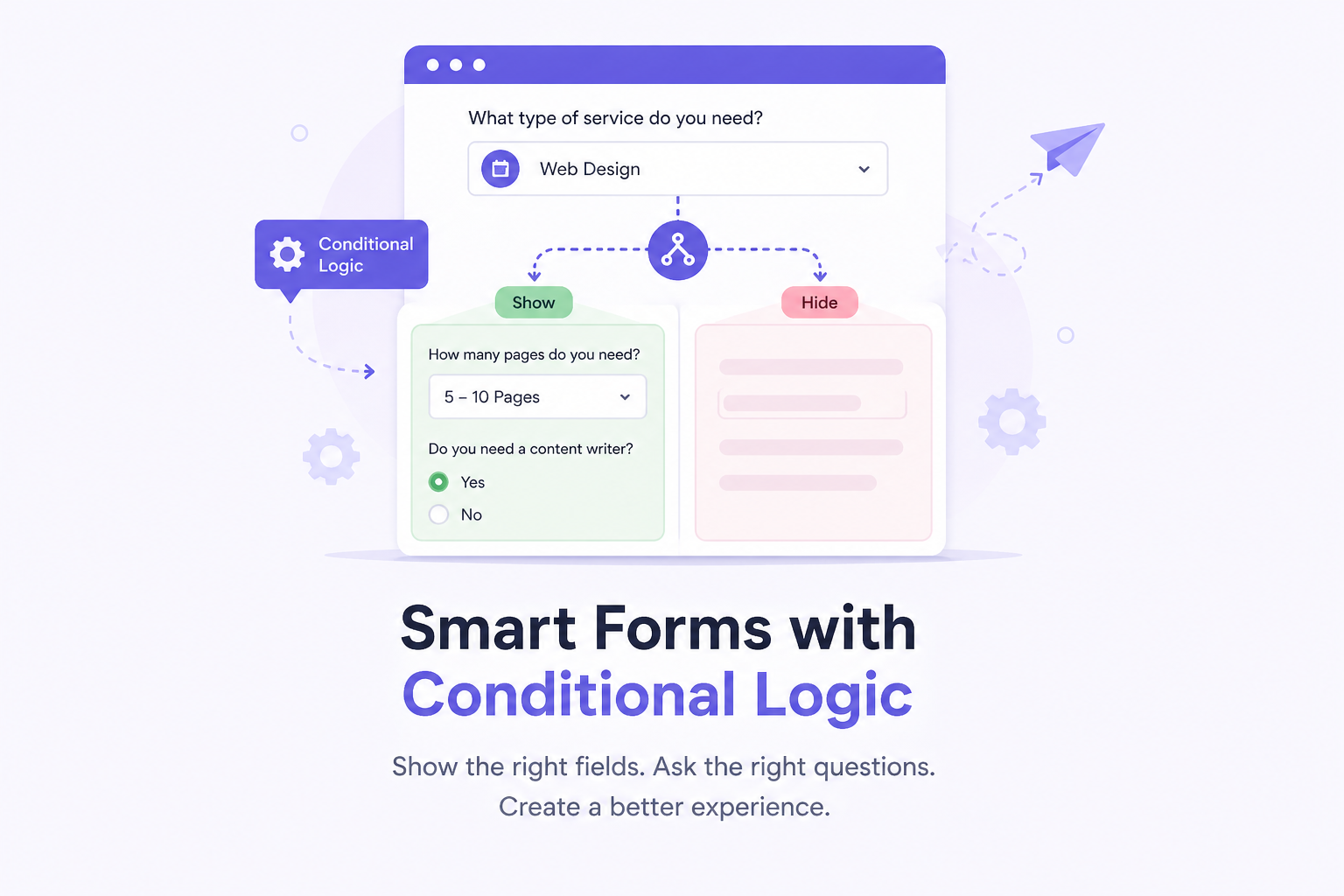
Modern websites demand smarter interactions. By using conditional logic for Elementor, you can control how your form behaves based on user input. This means your visitors only see relevant questions, making the entire process faster and more intuitive.
For example:
This approach enhances usability and improves completion rates.
With advanced Elementor conditional logic, you can:
Build a complete form on 100% free Elementor — no Elementor Pro or Hello Plus required. Same 12-operator conditional logic engine, and every Pro feature below works on it too.
Add a field that computes its own value live from a formula referencing other fields — like {qty} × {price} for an instant total. Updates as visitors type, and is recalculated authoritatively on the server at submission so it can never be spoofed.
Show or hide ANY Elementor widget, section, column, or container — not just a form field — based on a URL parameter, a cookie, another field's live value, login status, or device type. Works anywhere on the page, no form required.
The plugin integrates seamlessly with Elementor, making it simple to add conditional fields for Elementor form without coding. You can manage everything directly from the Elementor editor.
Create smarter forms using Elementor conditional fields that respond instantly to user actions. Whether it’s a dropdown, checkbox, or text input, every field can be customized dynamically.
The plugin ensures smooth performance by updating fields instantly. Your Elementor conditional form becomes interactive without page reloads, delivering a seamless experience.
From basic show/hide conditions to advanced field groups and email routing — the full toolkit, built for Elementor.
Show or hide any form field based on another field's value. Supports AND/OR logic and all 16+ Elementor field types.
== · != · > · < · >= · <= · empty · not empty · contains · does not contain · starts with · ends with.
Hidden step fields are automatically skipped during validation. Forms never get stuck on a hidden required field.
Send users to different thank-you pages after submission based on what they entered — perfect for lead segmentation.
Route notification emails to different team members or addresses based on form field values — zero extra plugins.
Group fields into numbered sets. Users pick a group and only those fields appear — with a visual drag-and-drop builder.
Show or hide the submit button itself based on conditions — great for agreement checkboxes and completion gates.
Hidden fields are stripped server-side before processing — no spoofing, no junk data in your submissions.
One tiny JSON block + a lightweight vanilla JS engine. No jQuery dependency, no external requests, no slowdown.
Stop showing every field to every user. Ask only what's relevant — forms get shorter, completions go up, data quality improves.
Using Elementor conditional form fields, you reduce clutter and present only relevant inputs. This makes forms easier to understand and complete.
Simplified forms lead to higher engagement. With Elementor form conditional logic, users are less likely to abandon forms midway.
Dynamic visibility ensures your forms look modern and organized, especially when using Elementor conditional logic form setups.
By applying Elementor form conditional fields, you collect only the necessary information, improving data quality and relevance.
Hidden fields are excluded server-side. No blank values, no junk — just the data you actually asked for.
Replace 3 separate forms with one intelligent form that adapts to each user's answers in real time.
The plugin is ideal for multiple applications:
With conditional fields for Elementor form plugin, you can adapt your forms to any business need.
If you're using Elementor Pro, this plugin becomes even more powerful. It works perfectly as conditional fields for Elementor Pro, extending the default form capabilities.
You can easily build advanced logic-based forms using:
This makes it a reliable Elementor form conditional logic plugin for professionals and businesses alike.
Don't have Elementor Pro? No problem — our own TNT Form widget brings the exact same conditional logic engine, and every Pro feature, to 100% free Elementor. You can build advanced logic-based forms using:
This makes it the only Elementor conditional logic plugin that doesn't quietly assume you're already paying for Elementor Pro.
If you already use Elementor forms, this plugin acts as a powerful upgrade. It extends the core functionality by adding conditional fields for Elementor form Pro, making your forms smarter and more adaptable.
From basic use cases to advanced workflows, this tool ensures your forms stay modern, efficient, and conversion-focused.
While the plugin is easy for beginners, it also offers flexibility for advanced users. Developers can leverage Elementor conditional logic plugin capabilities to create scalable solutions for clients.
This ensures your forms can grow along with your project needs.
Performance matters, especially on mobile devices. This plugin is optimized to ensure your Elementor conditional form fields work smoothly across all screen sizes.
Using conditional fields for Elementor form Pro, your forms remain efficient without slowing down your website.
No coding. No complex configs. Just logical steps inside the Elementor editor you already know.
Upload the plugin from WordPress.org (or your Pro download), activate it, go to Advanced Cond. Fields → Features and toggle on Conditional Logic. One click.
Already have Elementor Pro? Edit any page with an Elementor Pro Form widget — every field gets a new Conditions tab automatically. On free Elementor? Drag our own TNT Form widget onto the page instead — same Conditions tab, same rules, no Elementor Pro required.
Click any field → Conditions tab → toggle Enable Conditions → pick a Field ID, choose one of 12 operators, enter a value. Add as many rules as you need with AND/OR logic.
The Elementor editor shows fields appearing and disappearing live as you configure rules — no need to leave the editor to test.
Hit Update. Your form is live with intelligent conditional logic. No shortcodes, no custom CSS, no developer needed.
When building long or detailed forms, breaking them into steps improves usability. By combining step-based layouts with Elementor form conditional logic, you can:
Using Elementor conditional form fields, each step becomes more relevant, reducing drop-offs and improving completion rates.
Most Elementor form add-ons give you one or two features. We built the full suite.
| Features | TNT Conditional Fields | Competitor A | Competitor B |
|---|---|---|---|
| Works without Elementor Pro | ✔ Yes — own TNT Form widget | ❌ Requires Elementor Pro | ❌ Requires Elementor Pro |
| Calculated Fields (live formula) | Yes | No/td> | No/td> |
| Show/Hide fields with conditions | ✔ | ✔ | ✔ |
| Number of condition operators | 12 operators | 4–6 only | 6 only |
| Conditional Redirect | ✔ | ✔ | - |
| Conditional Submit Button | ✔ | - | - |
| Form Field Groups (visual builder) | ✔ | - | - |
| Free tier available | ✔ | - | - |
The plugin is regularly updated to stay compatible with the latest Elementor versions. Whether you are using basic features or advanced Elementor conditional logic, you can expect stability and performance.
One of the biggest advantages of this plugin is its simplicity. You don’t need programming knowledge to create advanced forms. With Elementor conditional form fields, everything is controlled visually.
Even complex Elementor conditional form setups can be created in minutes.
"This plugin completely changed how I build forms. Using Elementor conditional logic, I can now create clean and interactive forms without overwhelming users. It’s simple, powerful, and saves a lot of time."
"I was looking for a way to improve lead quality, and this tool delivered. With Elementor form conditional fields, I can filter inquiries and collect only relevant data. It has definitely improved our conversions."
"As a developer, I needed flexibility, and this plugin delivers exactly that. The Elementor conditional logic plugin features allow me to build complex workflows for clients with ease. Highly recommended for advanced users."
"I use conditional fields for Elementor form Pro for my booking forms, and it works perfectly. Customers only see the fields they need, which makes the process faster and more professional."
"This is the perfect upgrade for Elementor forms. The Elementor form conditional logic plugin is easy to use, responsive, and works smoothly on all devices. It has become an essential part of my workflow."
"I replaced three separate contact forms with one smart form. The conditional redirect feature is a game-changer — different clients now land on different pages automatically."
"The server-side field removal is the detail that sold me. Other plugins show/hide client-side only — this one actually strips hidden data before it hits my CRM. Finally."
"Field Groups are brilliant for our service selection forms. Clients pick a service type and see only the relevant fields — form completions went up by 38% the first week."
"Conditional email routing was the one feature I could never find for Elementor. Now our enquiries go straight to the right department — no more forwarding emails manually."
"Set up in under 10 minutes. The Conditions tab appears right inside the form field panel — exactly where you'd expect it. No digging through menus or reading documentation."
"I was skeptical about yet another conditional logic plugin, but the 12 operators including 'starts with' and 'ends with' actually solved a real problem I had with email domain filtering."
The Free plugin works on WordPress.org indefinitely. Go Pro for the full conditional logic suite.
Free
The essentials, always free on WordPress.org.
Pro
Single Site / year
Agency
3 Sites / year
Conditional fields for Elementor forms allow you to show or hide specific fields based on user input. With Elementor conditional logic, your form becomes dynamic, displaying only relevant questions and improving the overall user experience.
Yes, this plugin is fully compatible with Elementor Pro. It works perfectly as conditional fields for Elementor Pro, extending the default form features and enabling advanced Elementor form conditional logic without any coding.
Absolutely. Using Elementor conditional logic form features, you can build multi-step forms, apply multiple conditions, and create complex workflows. The plugin supports advanced rules for professional and business use cases.
No, the plugin is optimized for speed and efficiency. Your Elementor conditional form fields load quickly and function smoothly across devices, ensuring fast performance even when using conditional fields for Elementor form Pro.
You can create a wide range of forms including contact forms, job applications, booking forms, surveys, and more. With conditional fields for Elementor form plugin, you can design forms that adapt to user input and meet different business needs.
Yes. The plugin ships its own TNT Form widget, which works on 100% free Elementor with no Elementor Pro or Hello Plus required — same conditional logic engine, plus every Pro feature (Conditional Redirect, Conditional Email, Conditional Submit Button, Form Field Groups, Calculated Fields, Multi-Step Forms, and Dynamic Visibility). Already have Elementor Pro? Conditions still work on its native Form widget too — either way you're covered.
It's our own Elementor widget, included free, for building a complete form — with the full conditional logic engine and, on Pro, every advanced feature — without needing Elementor Pro or Hello Plus at all. Drag it onto any page from the Elementor widget panel like any other widget.
Never. Hidden required fields are automatically bypassed during both client-side and server-side validation. The plugin strips hidden field data before it reaches Elementor's processing pipeline — so your form submits cleanly every time.
In the Elementor editor, click any form field → go to the Advanced tab → look for the ID field. That's the value you enter in the "Field ID" input when building a condition rule. Make sure each field has a unique, lowercase ID with no spaces.
No. The plugin outputs a single small JSON data block inline before the form, then uses a lightweight vanilla JavaScript engine (no jQuery dependency). There are zero external HTTP requests and no blocking scripts. The performance impact is negligible — typically under 5ms of additional parse time.
No — and you don't need to. The Pro plugin includes everything the Free plugin does, plus all four Pro features. When you activate Pro, it automatically deactivates the Free version. When you activate Free, it checks for Pro and deactivates itself if Pro is running. Conflict-free by design.
Pro updates are delivered through WordPress's native update system — exactly like any other plugin. When a new version is available, you'll see the update notification in Dashboard → Updates or Plugins. Click Update and WordPress handles the rest automatically. No manual downloads required.
Yes. The plugin is fully compatible with PHP 7.4 through 8.3. It is tested against the latest WordPress version (6.7+) and Elementor Pro (4.x). We maintain compatibility with each major release.
A Pro feature that adds a read-only field whose value is computed live from a formula referencing other fields — for example {qty} * {price} for an instant order total. It updates as the visitor types and is recalculated authoritatively on the server when the form is submitted, so the value can't be tampered with.
No. Calculated Fields, Multi-Step Forms, Dynamic Visibility, and every other Pro feature work on our own free TNT Form widget. You only need an Elementor Pro license if you want conditions on Elementor Pro's own Form widget instead.
Getting started is quick and straightforward:
Within minutes, your Elementor conditional form fields will be fully functional.
There are many tools available, but this plugin stands out because of its simplicity and performance:
It’s a complete solution for anyone looking to enhance forms with conditional logic for Elementor functionality.
This plugin is widely useful across industries. Whether you're running a business website or managing client projects, conditional fields for Elementor — with or without Elementor Pro — help you create forms that match real-world requirements.
Common Business Applications:
With Elementor conditional logic plugin, businesses can deliver a more personalized and efficient user experience.
Adding conditional logic is no longer a luxury it’s a necessity for modern websites. With this plugin, you can create responsive, intelligent forms that adapt to user behaviour. From simple contact forms to complex workflows, conditional fields for Elementor form Pro give you the control you need to design better experiences and collect meaningful data.
Start Your 3-Day TrialFree forever on WordPress.org · 3-day free trial on Pro · No credit card for Free